For rentals & guest rooms
A WiFi sign for your Airbnb or guest stay
Give guests one clear place to find the network, scan the QR or type the password. Start with the fictional Juniper Cottage sign and replace the details.
Customize the guest-stay sign5 × 7 in to start · All designs and sizes are free
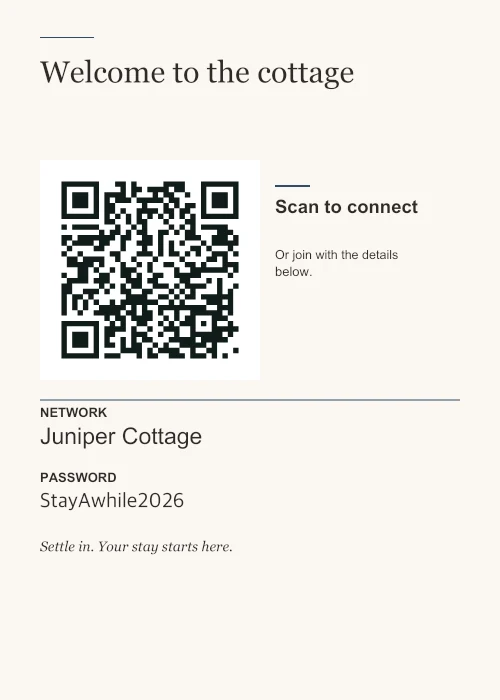
Make it part of the arrival.
Put the sign where a guest is likely to look before unpacking: beside the welcome information, on a desk or near the bedside table. A QR in a cupboard is still another thing they need to ask you for.
A 5 × 7 in print suits many small frames. A 4 × 6 in print needs less table space. If you use a larger sheet, choose A4 or US Letter in the maker rather than enlarging a small PDF with “Fit to page”.
Leave a way to type the details.
A laptop may need a manually entered network name and password. Keep the password-as-text option on if that fallback matters for your guests. Hiding the printed password does not make the QR private: its contents can still be read.
Where your router supports one, use a guest network. Enter the exact name, including spaces and punctuation. This tool cannot create a guest network or alter the router.
Choose labels your guests can read.
The bilingual example adds English–Spanish network and password labels. English–French and English–German are also available, along with single-language Spanish, French and German labels. Your custom title and note are not automatically translated; write them the way you want them to appear.
Edit the English–Spanish guest sign.
Check it between stays.
Scan a test print with a phone and confirm it offers the intended network. Try connecting while near the router. If you change the network name or password, make a new sign and replace every old copy, including any image you sent to guests.
Keep a dry, readable copy and check that a frame or glossy cover is not reflecting light across the QR. Follow the printing guide for actual-size settings and scan checks.
Make it your network.
Choose a design, replace the details, and print a copy for your space.