For cafés & visitor spaces
A printable WiFi sign for your café
Make the guest network easy to spot without turning your counter into a noticeboard. Start with a small Coffeehouse print, then choose the right network settings.
If customers must open a web page to sign in or accept terms, this maker cannot complete that step. Follow your network provider’s instructions.
Customize the café sign4 × 6 in to start · Add your logo locally
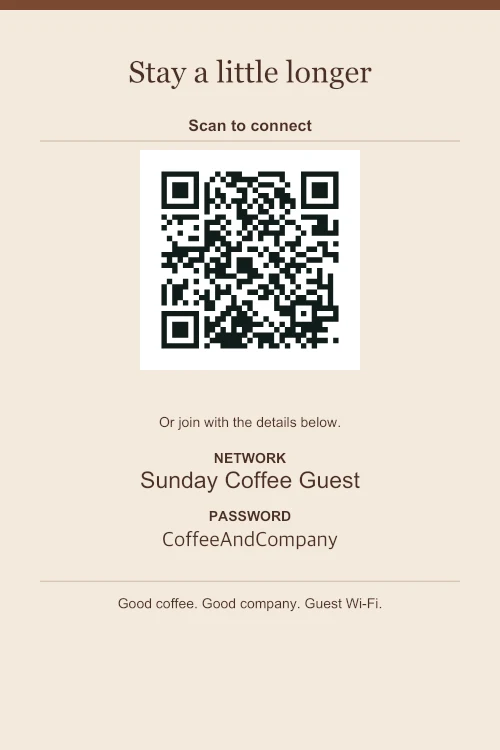
First, check how customers connect.
A password-protected guest network can be encoded in the QR with its name and password. An open network can use the “Open network” setting, with no password. Pick the setting that matches the router, not just the appearance you prefer.
If customers must open a browser, accept terms or sign in through a portal, this static WiFi QR cannot complete that flow. It also does not support enterprise sign-ins. Do not promise one-scan access to a network that still needs those steps.
Give the code a clear place.
A 4 × 6 in tabletop holder is a small starting point for a counter. A4 or US Letter may suit a wall or a shared seating area, but the right size depends on how close people can get and the light in the room. Test from the spot where customers will actually stand.
Keep a glossy cover out of direct glare and leave the white area around the QR clear. The maker places a logo in the corner rather than over the code. PNG, JPG or WebP images are processed on your device, up to 2 MB and 20 megapixels.
Make room for a manual connection.
Keep the network name easy to read. Showing the password as text helps laptops and phones whose cameras do not offer WiFi joining. Use a guest network where available; a photograph of the QR can reveal its credentials.
If the network has no password.
The open-network example removes the password field and prints “No password needed”. It still points to the network name you enter, and does not bypass any extra login page.
Print a proof before a batch.
Download PDF for a predictable page size, select the matching paper and print at Actual size. Scan the first copy and try connecting. If you change your network details, replace the printed sign rather than expecting an existing QR to update.
See the printing and scan checklist or compare the three sign designs.
Make it your network.
Choose a design, replace the details, and print a copy for your space.